
AKS Cluster Access for Cloudaware

This guide explains how to grant Cloudaware read-only access to an Azure Kubernetes Service (AKS) cluster so Cloudaware can automatically discover Kubernetes resources.
Prerequisites
You have Owner/Contributor or appropriate permissions in Azure to view the enterprise applications and AKS configuration.
You have cluster-admin (or equivalent) permissions in the AKS cluster to apply RBAC objects.
You have
kubectlinstalled and configured to connect to the target AKS cluster.
Overview
Cloudaware discovery requires access to Kubernetes API resources (pods, nodes, namespaces, etc.). The access model depends on whether your AKS cluster uses Entra ID (AD)-based authentication/authorization.
Entra ID integration is disabled (non-AD-managed cluster)
If your AKS cluster is not Entra ID (AD)–managed, grant Cloudaware the Azure permission:
Microsoft.ContainerService/managedClusters/listClusterUserCredential/read
This allows Cloudaware to retrieve cluster user credentials for discovery.
Entra ID integration is enabled (AD-managed cluster)
AKS can authorize access via Entra ID identities. Create a ClusterRoleBinding in Kubernetes for the Azure application (service principal) used by Cloudaware.
Continue with the steps below.
Step 1. Get the service principal Object ID for the Cloudaware Azure application
Sign in to the Azure portal.
Navigate to Microsoft Entra ID.
Open Enterprise applications.
Select the application you configured for Cloudaware, e.g., cloudaware-api-access.
In Overview, copy the Object ID.
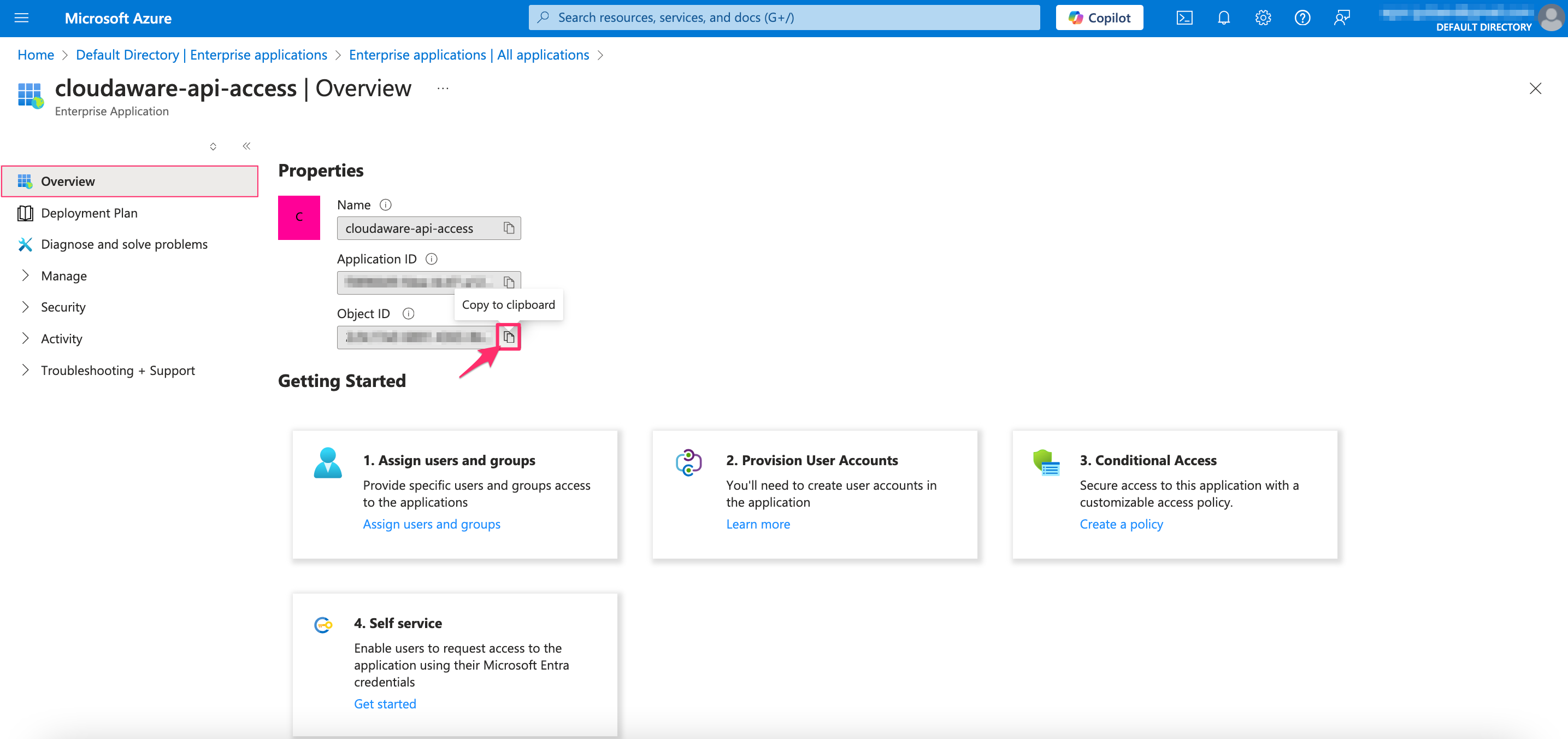

Use the Enterprise application Object ID (service principal Object ID), not the Application (client) ID.
Step 2. Create the RBAC manifest
Create a file cloudaware-rbac.yaml with the content below. Replace the placeholder {SERVICE-PRINCIPAL-OBJECT-ID} with your service principal Object ID.
apiVersion: rbac.authorization.k8s.io/v1
kind: ClusterRole
metadata:
  name: cloudaware-reader
rules:
- apiGroups: ["*"]
  resources: ["*"]
  verbs: ["get", "watch", "list"]
---
apiVersion: rbac.authorization.k8s.io/v1
kind: ClusterRoleBinding
metadata:
  name: cloudaware-reader-application-binding
roleRef:
  apiGroup: rbac.authorization.k8s.io
  kind: ClusterRole
  name: cloudaware-reader
subjects:
  - apiGroup: rbac.authorization.k8s.io
    kind: User
    name: {SERVICE-PRINCIPAL-OBJECT-ID}
What this does:
cloudaware-readerinClusterRolegrants read-only access (get,list,watch) across cluster resources.cloudaware-reader-application-bindinginClusterRoleBindingbinds that role to the Entra ID identity for Cloudaware’s enterprise application.

To collect CustomResourceDefinition objects and custom resources, add the following permissions:
rules:
- apiGroups: ["apiextensions.k8s.io"]
  resources: ["customresourcedefinitions"]
  verbs: ["get", "list", "watch"]
and
rules:
- apiGroups: ["spv.no"]
  resources: ["azurekeyvaultsecrets"]
  verbs: ["get", "list", "watch"]
Step 3. Apply the manifest
Run the command:
kubectl create -f cloudaware-rbac.yamlAllow up to 24 hours for AKS resources to appear in the Cloudaware CMDB.

If the AKS cluster is not reachable from Cloudaware due to private networking, use the Cloudaware Breeze agent for a secure connection. Read more
AKS objects discovered by Cloudaware
Cloudaware supports discovery of the following AKS cluster objects:
Azure AKS Cluster
Azure AKS Cluster Agent Pool Profile
Azure AKS Cluster Config Map
Azure AKS Cluster Daemon Set
Azure AKS Cluster Deployment
Azure AKS Cluster Endpoint
Azure AKS Cluster HPA
Azure AKS Cluster Ingress
Azure AKS Cluster Limit Range
Azure AKS Cluster Namespace
Azure AKS Cluster Network Policy
Azure AKS Cluster Network Policy Rule
Azure AKS Cluster Node
Azure AKS Cluster Node Address
Azure AKS Cluster Node Condition
Azure AKS Cluster Public IP Address Link
Azure AKS Cluster Public IP Prefix Link
Azure AKS Cluster Pod
Azure AKS Cluster Pod Container
Azure AKS Cluster Pod Disruption Budget
Azure AKS Cluster Replica Set
Azure AKS Cluster Role
Azure AKS Cluster Role Bindings
Azure AKS Cluster Resource Quota
Azure AKS Cluster Secret
Azure AKS Cluster Service
Azure AKS Cluster Stateful Set